ArcBrush 1.6.3
The node-based
image editor.
Wire nodes together to build procedural, non-destructive image pipelines.
- Runtime
- Native C++20
- Platforms
- Windows / macOS / Linux
- License
- Personal free / Pro $49 once
- Trial
- 14 days, inside the app
01 / The model
Procedural power,
for image editing.
- The node graph you know from Houdini, Blender, Nuke, Substance, and Unreal, applied to image production.
- Composable, non-destructive, and endlessly re-runnable.
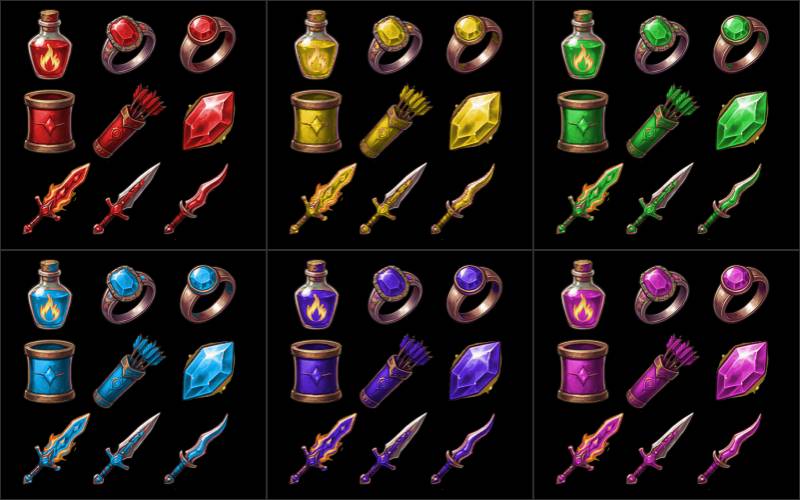
Game Artists
Asset variants · Sprite sheets
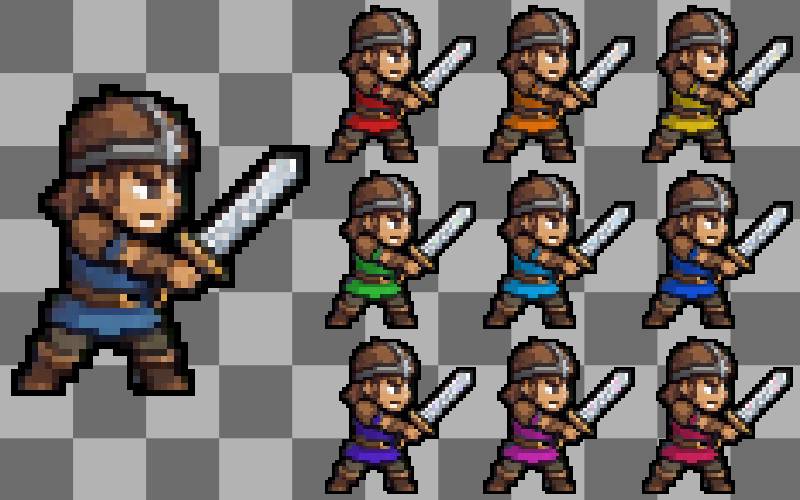
Pixel Artists
Retro styling · Palette quantizing
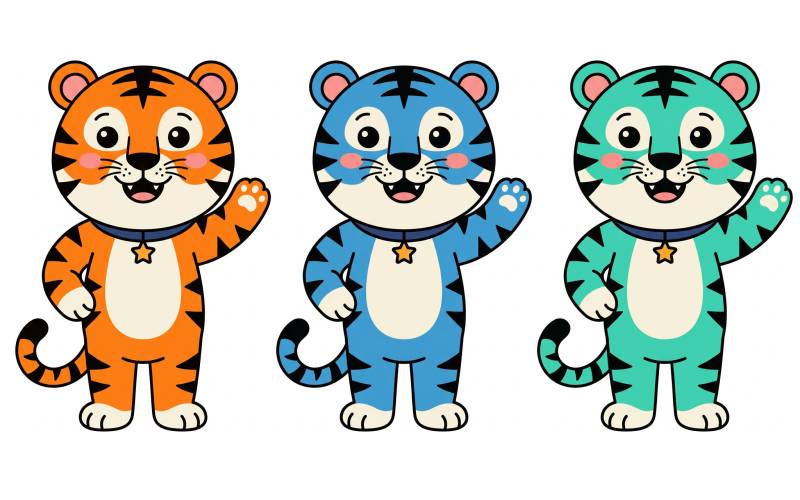
Illustrators
Color variants · Palette swaps
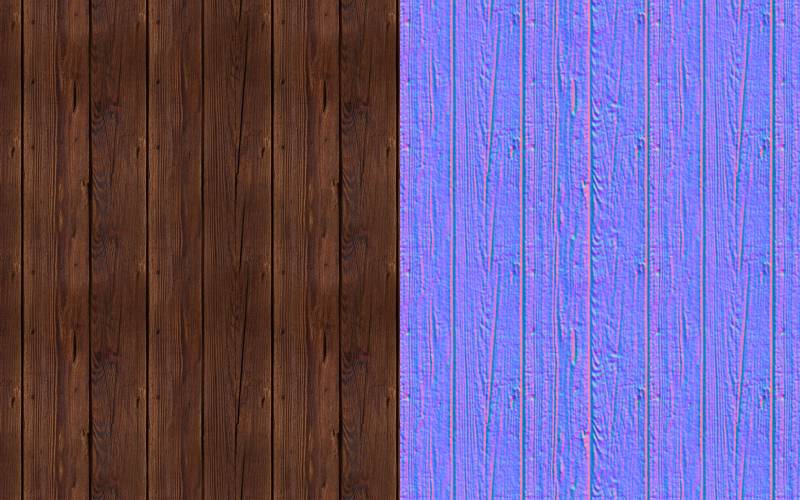
Texture Artists
Tileable textures · PBR maps
Designers
Brand systems · Multi-format
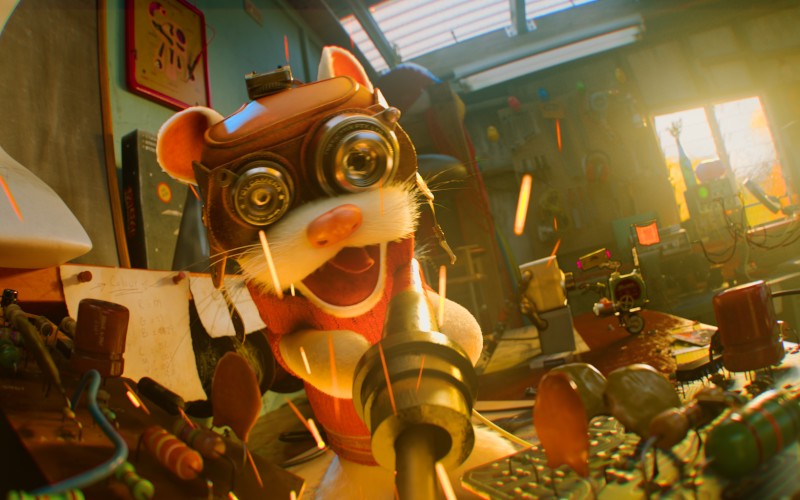
Compositors
EXR passes · Cryptomatte
Build once, export everything. When the client changes the palette, the art director wants it larger, or the engine needs a new format, you re-export instead of redoing.
02 / How it works
Your process,
as a graph.
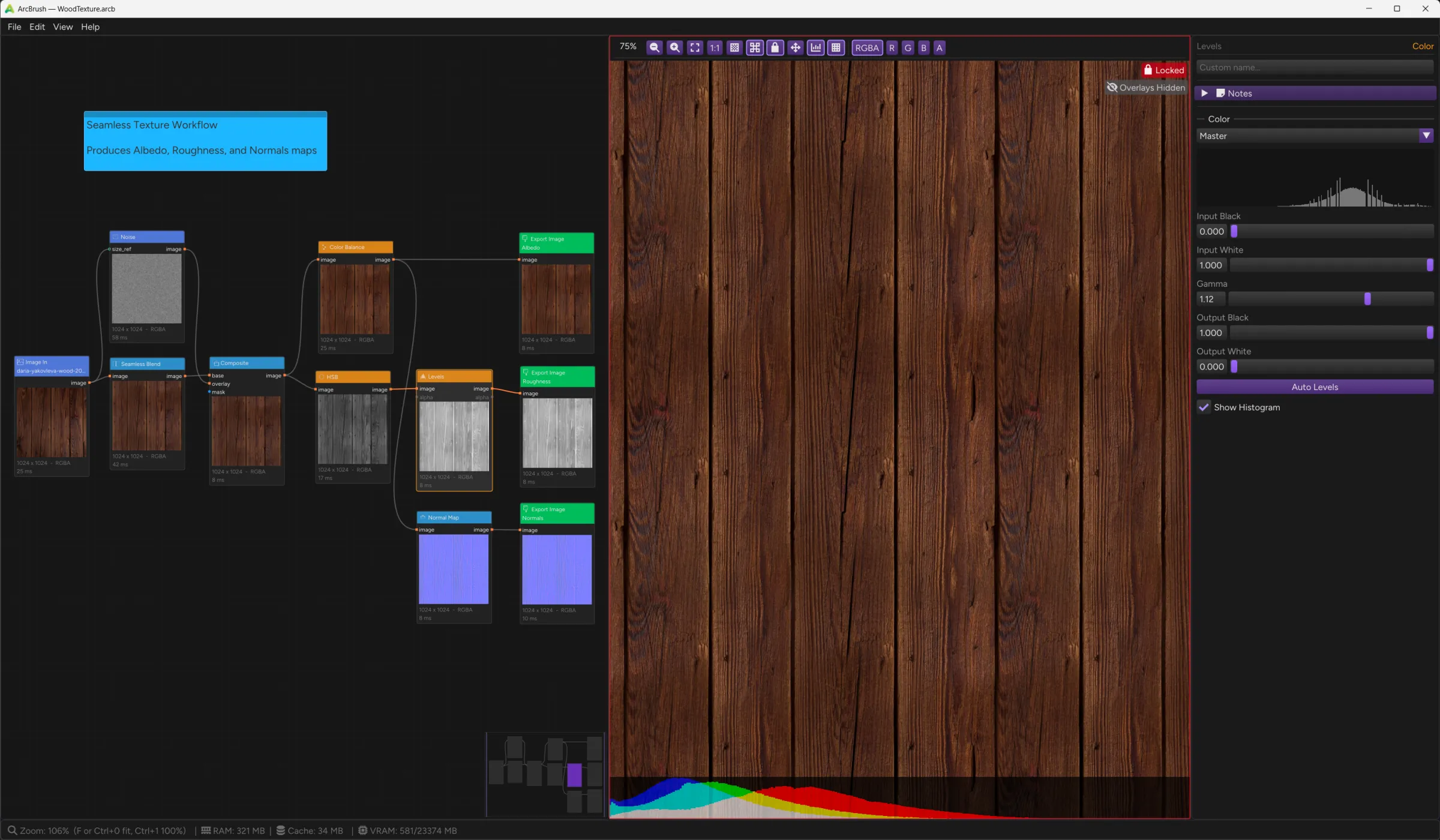
- Load, filter, warp, mask, remap, export: each is a node.
- Change one parameter and only the nodes downstream recompute.
- Nothing is baked, everything stays live.
Non-destructive
Every parameter stays live. Adjust a blur radius or swap a palette six months later; only the affected nodes re-evaluate.
.arcb is portable
One graph file holds every parameter, connection, and embedded asset, and opens identically on Windows, macOS, and Linux.
Live re-evaluation
Toggle Watch File on a source, edit it in another app, and the graph re-runs the moment the file changes on disk.
03 / Batch processing
Drop a folder.
Process everything.
Ten or ten thousand.
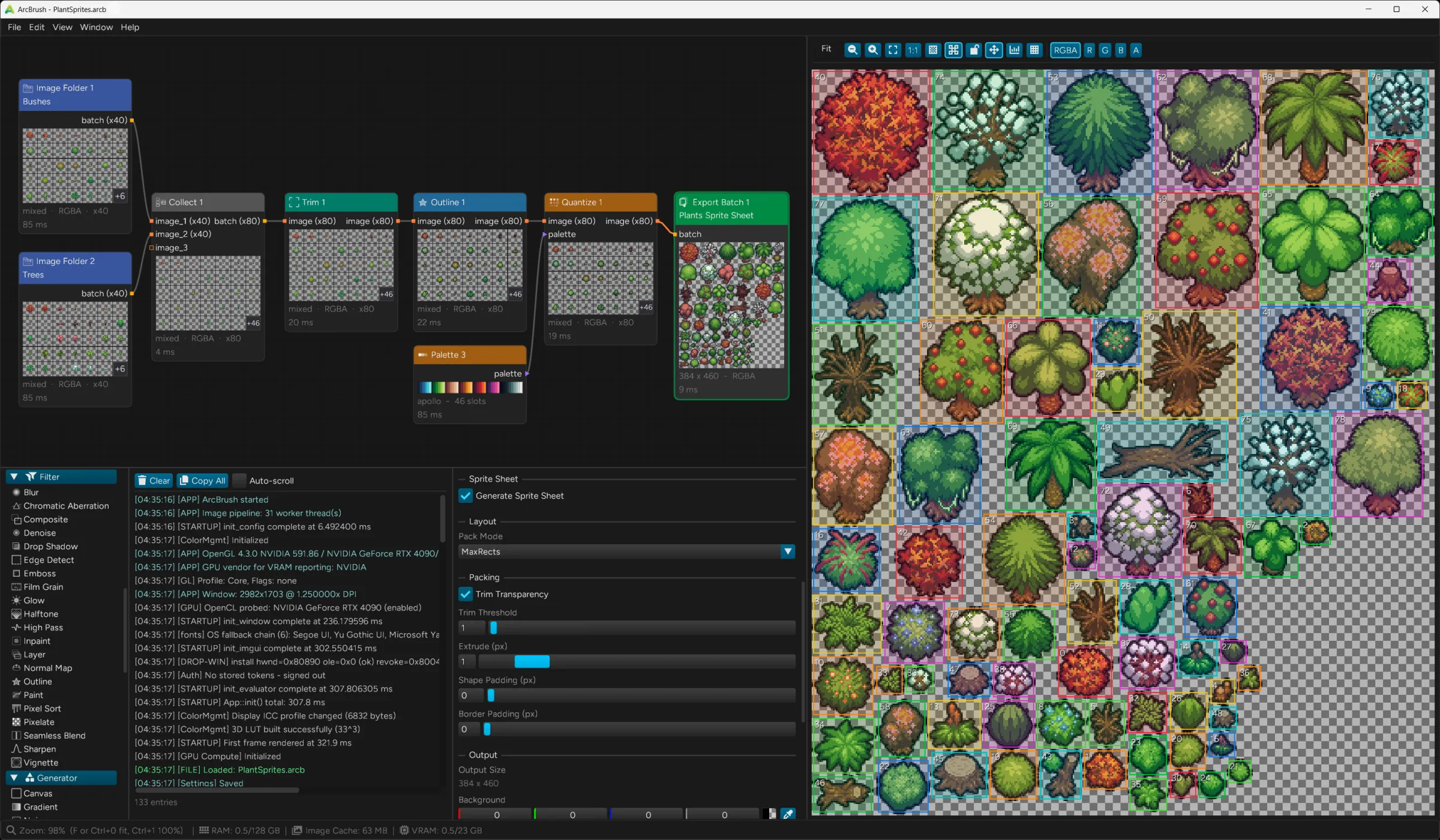
- Load a directory with Image Folder, wire it through any chain of filters and transforms, and connect Export Batch.
- Every frame flows the whole pipeline; hundreds of consistently named files land in your output folder.
Transparent propagation
Wire a batch into any node and every frame flows through it. No batch-specific modes, no loops, no scripting. Blur, Levels, Sharpen, and Color Balance all handle batches natively.
Folder scanning
Image Folder loads up to 10,000 files with glob-style filtering, recursive scanning, and sort by name/date/size.
Smart file naming
Export Batch names every output with configurable tokens, and a live preview shows the resolved filename as you type.
{name} {source} {index} {width} {height} {date} {node} {graph}
Live progress
Every node in the pipeline shows a progress bar during batch evaluation, and Export Batch tracks file writes in real time. You always know exactly where things stand.
Split and route
Decompose batches with Split: extract individual frames, divide into equal chunks, slice by index, or filter by name pattern. Branch your pipeline for per-frame or per-group processing.
Variant fan-out
Palette Remap and Separate multiply a batch: every input frame is combined with every variant (M × N). Name the outputs with {source}_{name}, or {color} for the variant color as hex.
{source}_{name}.png → tree_purple.png
04 / Painting
A complete
painting system.
Built into the graph.
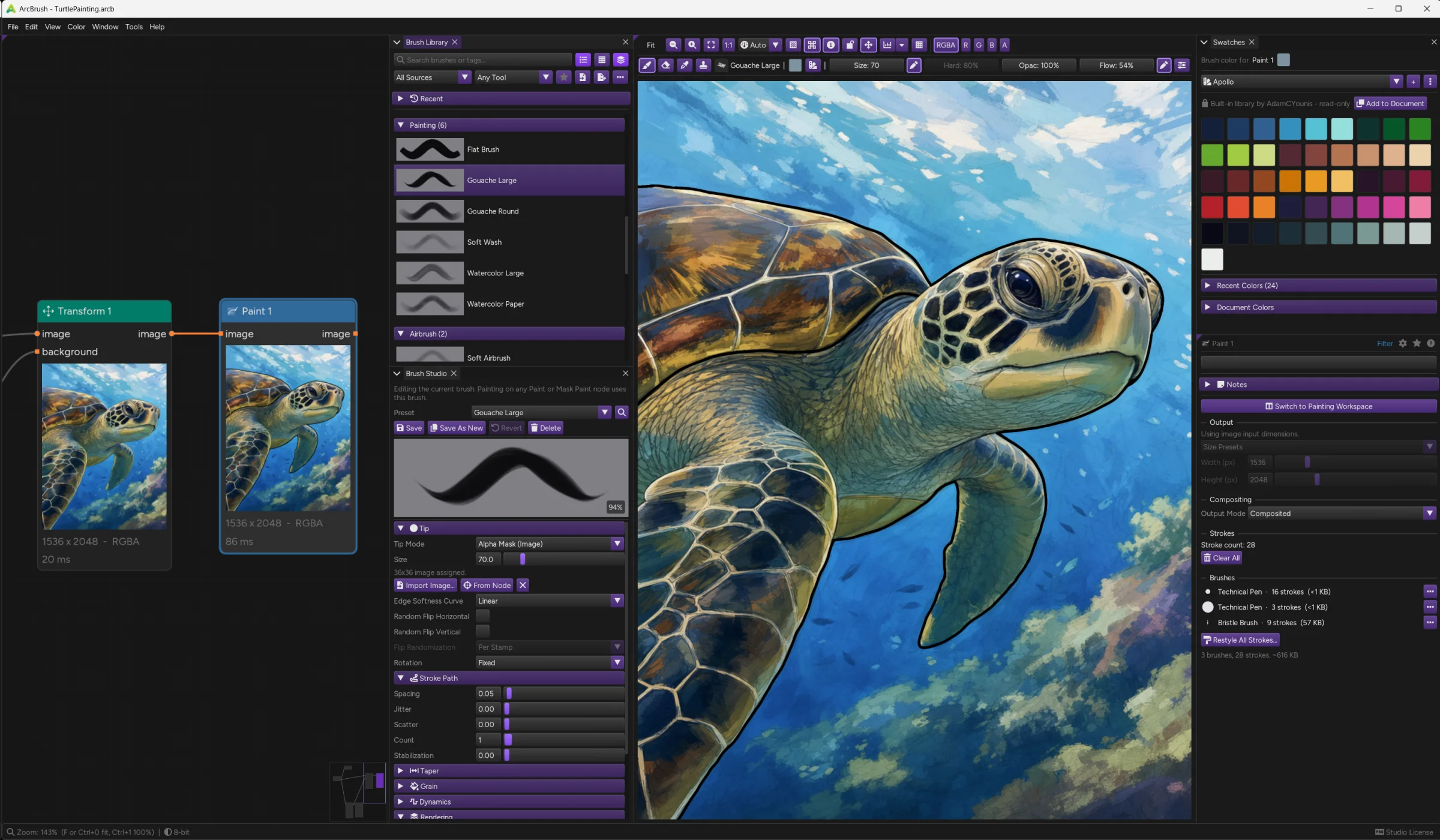
- Real tips and real grain, a Brush Library to keep your brushes in, and a Brush Studio to build them in.
- Strokes respond to how you actually draw.
- Everything you expect from a dedicated painting app, in the same document as the rest of your pipeline.
Brush tips
A procedural round, ellipse, or square, or an image: an alpha mask you tint, a color image stamped as authored, or a lightness map recolored while keeping its own light and dark. Rotation follows tilt or twist.
Grain
Paper tooth over the stroke, moving with each dab or fixed to the canvas, with scale, rotation, offset, strength, and invert. Generate it on the Noise node's own engine, seamless, no image file needed.
Dynamics and pen input
Map any input (pressure, tilt, twist, speed, direction, stroke progress, randomness) through a curve you draw onto size, opacity, angle, roundness, or color. Tablet signals are real on Windows and macOS, down to the stylus eraser switching tools.
Stroke path
Spacing, flow, jitter, scatter, and taper shape how dabs land along the stroke. Stabilization smooths hand jitter, with a guide line to the trailing tip so the stroke ends where the tip is.
Blend modes
Every brush carries its own blend mode, applied once per whole stroke. Strokes blend with each other and the layer below, but never darken themselves where they cross.
Brush tips from the graph
Point Brush Studio at any node and its output becomes the tip or the grain: a texture you built with nodes is one click from being a brush, embedded so the file stays self-contained.
29 built-in brushes to start
Across 7 brush categories: Basic, Sketching, Inking, Painting, Airbrush, Dry Media, and FX. Then build your own from a shape, an image, or any node in the graph.
Bring the brushes you own
Photoshop .abr and GIMP .gbr packs import with every brush previewed as ArcBrush will really render it, so you pick what you want and it lands sorted into a category you name. Share your own set as one .arcbbrushpack.
Strokes stay editable
Painted a hundred strokes with the wrong brush? Pick a new one and re-render every stroke that used the old, or the whole node at once, with erasing and cloning left alone unless you ask. One undo step.
05 / Palette variants
One graph.
Every color variant.
Automatically.
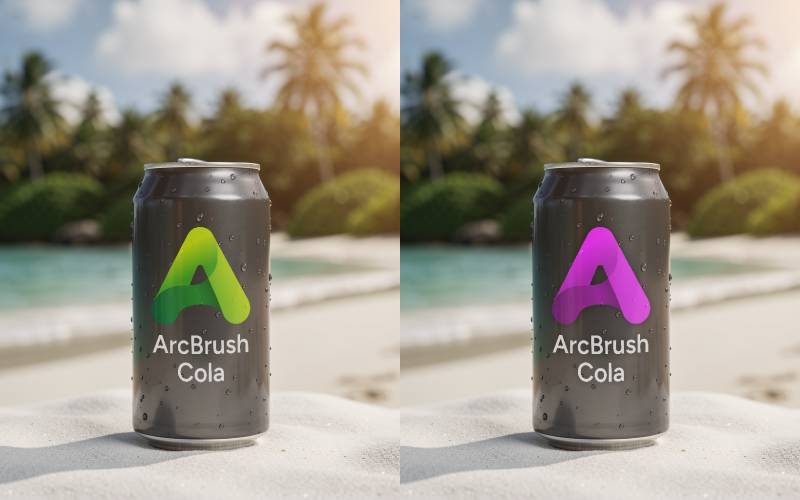
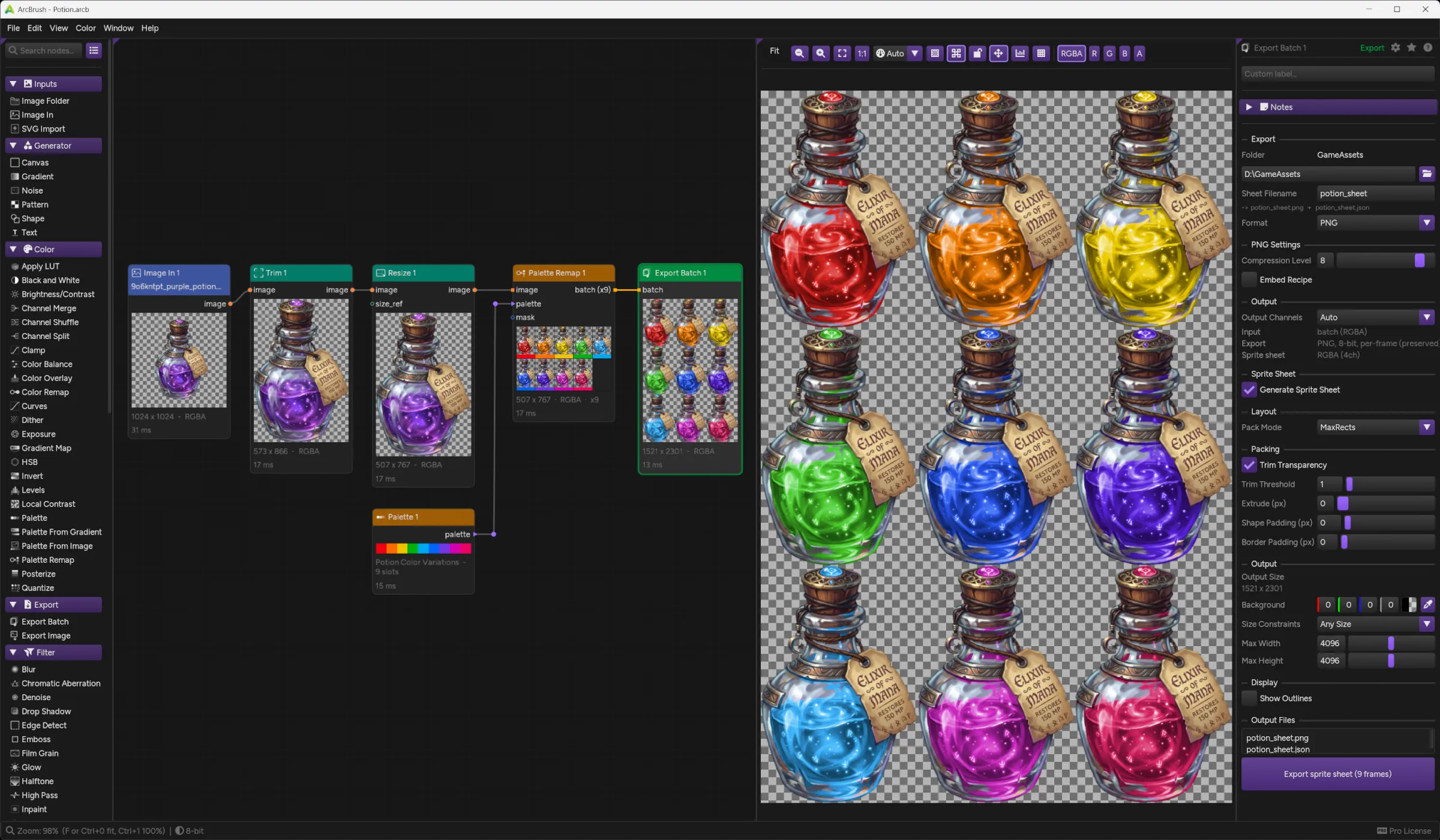
- Define a palette of nine named colors, wire it into Palette Remap, connect Export Batch.
- Nine recolored PNGs land in your folder, each keeping the original's highlights, shadows, and gradients.
- Change the palette, re-export.
Luminance preserved
The remap shifts hue and saturation in perceptual color space. Highlights stay highlights, shadows stay shadows. The recolor looks painted, not tinted.
Import palettes
Drop in .gpl, .ase, .pal, and .aseprite palettes from Aseprite, Photoshop, GIMP, Krita, Illustrator, Affinity, or Inkscape, including names and colors.
Palette From Image
No palette? Feed any reference image into Palette From Image and it extracts the dominant colors automatically. Wire that into Palette Remap.
Named variants
Each palette slot has a name, and Export Batch uses it in the filename: potion_red.png, potion_blue.png. Consistent and automatic, every time.
Sprite sheet export
Export all variants as individual files, or pack them into a single sprite sheet with a TexturePacker-compatible JSON manifest, ready for your game engine.
One change, all update
Adjust the source art and every variant re-exports with the change. Adjust the palette and every variant shifts. The graph stays live.
06 / Puppet Warp
Reshape artwork
like it's clay.
- Drop pins on your image and drag them.
- ArcBrush builds a mesh over the artwork and bends it around the pins you hold still, so you can pose a character, fix a drawn limb, or curve a silhouette while the rest keeps its shape.
Play demo
Pin and pose
Click to place a pin, drag to move it. The pins you hold still anchor the image, and everything around them bends as rigidly as possible, so shapes keep their proportions instead of smearing.
One dial to pose
Pose Strength scales the whole pose at once, from rest to full and past it, without touching a single pin. Ideal for easing a pose in or dialing one back.
Across a batch
One mesh is built and the same pose is applied to every frame, so a whole set of asset variants poses consistently in a single pass.
07 / Under the hood
Native. Not a web app.
Not Electron. Not a wrapper.
- ArcBrush is a C++20 desktop application for Windows, macOS, and Linux.
- A hybrid engine processes your images on the CPU and GPU, previews render on the GPU, and nearly every operation runs natively on your hardware.
01
C++20
A native binary compiled for Windows, macOS, and Linux. No runtime dependencies, no browser engine, a lightweight installer, and a fast cold start.
Installer: 10.3 MB Win · 13.1 MB Mac · 18.9 MB Linux
02
GPU-accelerated
Image processing offloads to your GPU when one is available, and falls back to the CPU on every operation. Larger images route to the GPU for speed.
Automatic GPU / CPU routing
03
Parallel processing
Every per-pixel operation distributes across all of your CPU cores. Large images process in fractions of a second.
All cores · adaptive threading
04
Smart evaluation
Only the nodes downstream of a change re-evaluate. Fast nodes update instantly; heavy nodes wait until you stop dragging. Nothing recomputes needlessly.
Incremental · adaptive debounce
05
Typed connections
Five pin types (Image, Mask, Palette, Batch, Size Reference), each with strict connection rules, so the graph blocks invalid wiring before you make it.
5 pin types · strict rules
06
Open format & auto-save
.arcb files are human-readable JSON. Your work auto-saves at regular intervals, with crash recovery on the next launch.
JSON · portable · crash recovery
08 / The Pro pipeline
Scene-referred color,
managed end to end.
The free editor is 8-bit, like most image tools, and that covers most work. Pro flips the document to 32-bit float and ArcBrush becomes a real color-managed pipeline: working spaces, display transforms, and predictable round-trips with the rest of your toolchain, on the same OpenColorIO that film and VFX pipelines run on.
Pro · $49 once · 14-day free trialOpen standards, in the box

 ACES 2.0
 ACEScg, ACEScct, and Linear working spaces on a bundled, version-pinned ACES 2.0 Studio OCIO config.
-
01 · Import
Camera and encoded sources decode into the working space you choose. That choice is the pipeline contract, recorded in the .arcb file.
16-bit PNG/TIFF · float TIFF · multi-layer/multi-part EXR · Input color-space picker
-
02 · Edit
Every node processes 32-bit float. Values brighter than white survive the whole graph, and compositing happens in linear light.
HDR values · linear compositing
-
03 · View
The viewport renders through the ACES 2.0 or AgX output transforms, or Standard when you want your exact authored values.
ACES 2.0 · AgX · Standard · Raw
-
04 · Deliver
Export as displayed, converted to a target color space, or raw working-space data: 16-bit, 32-bit float TIFF, or OpenEXR.
EXR half / float · OCIO color-space picker
09 / Node library
99 nodes. 11 categories.
Infinite combinations.
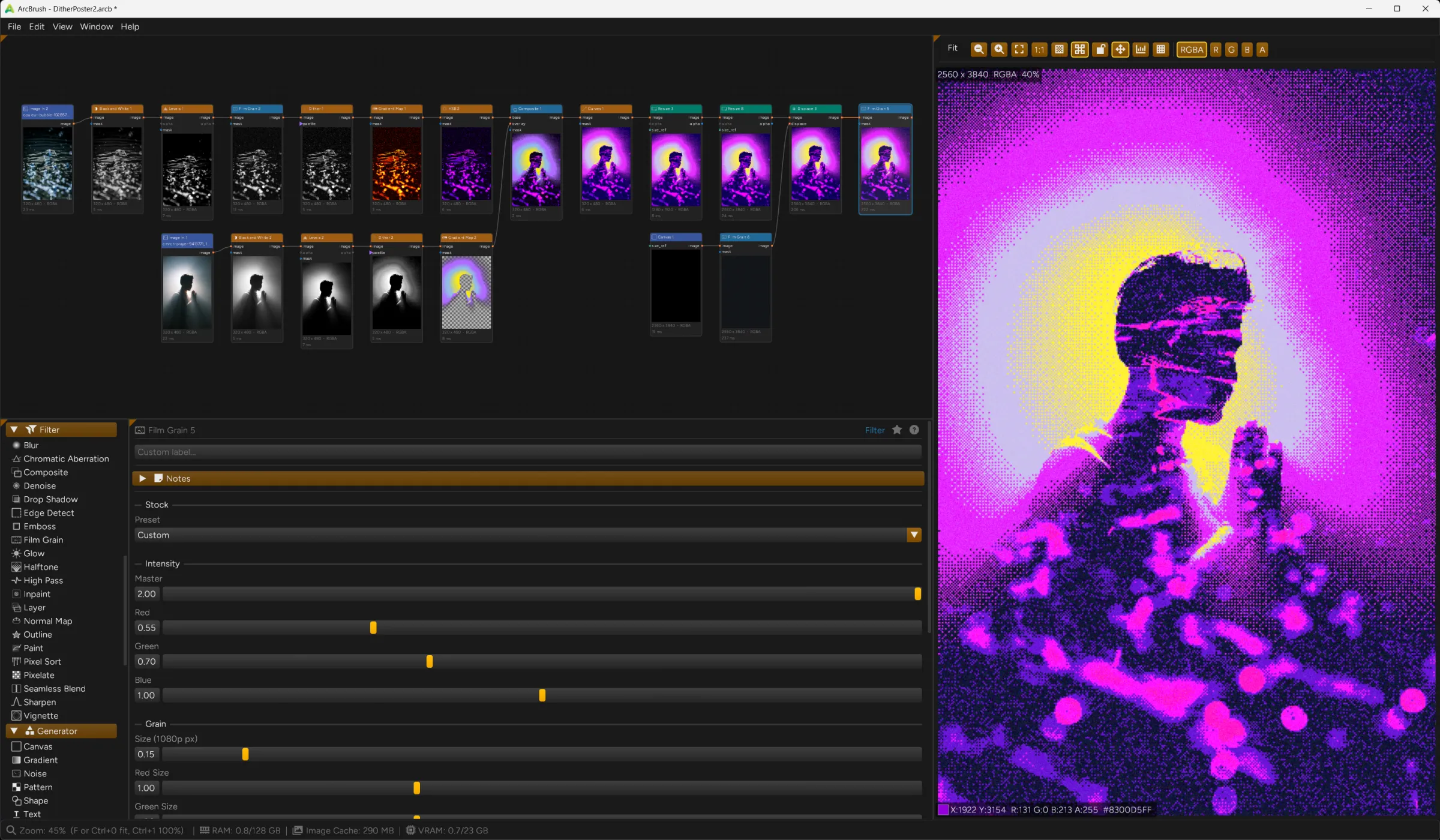
- ArcBrush includes nodes for basic inputs, procedural generators, pixel-level color control, mesh warps, keying, compositing, and batch export.
- Every operation has a dedicated, composable node.
Inputs
3Image In
Load PNG, JPEG, WebP, TIFF, OpenEXR, TGA, or BMP from disk or clipboard
Image Folder
Load all images from a folder as a batch
SVG Import
Vector import with resolution-independent rasterization
Generators
6Canvas
Solid color starting point at any resolution
Gradient
Linear, radial, angular, diamond gradients with multi-stop colors
Noise
Perlin, Simplex, Clouds, Voronoi, White noise with fBm and domain warp
Pattern
Checkerboard, stripes, dots, hexagons, brick
Shape
Circle, rectangle, polygon, star, ring with optional stroke and tile mode
Text
Render text with system or custom .ttf/.otf fonts, with full alignment and rotation
Transform
19Arrange
Place images side by side, stacked, or in a grid for comparisons and layouts
Corner Pin
Four-point perspective warp with optional background plate
Crop
Extract a region by pixel coordinates or percentage
Displace
Pixel displacement driven by a grayscale or red/green channel map
Hex Tile
Break up visible tiling repetition with randomly rotated, blended hex cells
Lens Distortion
Apply or correct camera-lens barrel, pincushion, and mustache distortion, plus bulge and sphere warps
Mesh Warp
Interactive bicubic Bezier grid deformation, drag control points to sculpt
Mirror
Flip horizontal or vertical, or mirror radially for kaleidoscope effects
Offset
Shift the image horizontally or vertically with optional edge wrapping
Pad
Add border padding with color or extend modes
Polar Remap
Cartesian-to-polar and polar-to-Cartesian coordinate transform
Puppet Warp
Pose and bend artwork with draggable pins on an auto-generated deformation mesh
Resize
Scale to exact dimensions or percentage with multiple algorithms
Rotate 90
Pixel-perfect 90/180/270 rotation with no interpolation
Smart Scale
Content-aware resize via seam carving, preserving important content
Sprite Sheet
Pack batch frames into a single grid image for game engines
Tile
Grid-based image repeat with mirror mode, row/column offset, and size reference
Transform
Translate, rotate, scale with interpolation and an interactive manipulator
Trim
Auto-crop transparent or solid-color edges
Filter
21Blur
Gaussian, box, median, motion, bilateral, edge-preserving, radial, zoom blur
Chromatic Aberration
Per-channel radial or uniform dispersion
Denoise
Noise reduction preserving edges and detail
Drop Shadow
Configurable offset, blur, color, and opacity
Edge Detect
Canny edge extraction with adjustable thresholds and custom colors
Emboss
Directional emboss with angle and strength
Film Grain
Physically-modeled film grain with seven calibrated stock presets
Glow
Bloom/glow effect with threshold and radius control
Halftone
Newspaper, manga, and offset-print dot screens in Grayscale, RGB, CMYK
High Pass
Isolate detail for sharpening, frequency separation, and texture flattening
Inpaint
Content-aware fill using mask regions
Normal Map
Generate normal maps from height/grayscale images for 3D lighting
Outline
Inner, outer, or center stroke around non-transparent regions
Paint
Interactive freehand painting directly on images
Pixel Sort
Reorder pixels along rows, columns, angles, or polar spokes for glitch effects
Pixelate
Reduce to chunky pixels with configurable block size, essential for pixel art
Relight
Point and directional lights driven by a normal map, with on-canvas gizmos and specular
Scatter
Stamp many randomized copies of an image across a canvas in area or circular layouts
Seamless Blend
Mirror-fold and content-aware blend to make any image tileable
Sharpen
Unsharp Mask and edge-preserving Detail Enhance
Vignette
Edge darkening with shape, size, and falloff
Composite
5Composite
Layer blending with 18 modes (Multiply, Screen, Overlay, Soft Light, more)
Layer
Composite images as a layer stack with per-layer blend, opacity, visibility
Merge
Porter-Duff coverage compositing: Over, In, Out, Stencil, Plus, and more
Premult
Convert straight alpha to premultiplied for correct compositing math
Unpremult
Convert premultiplied alpha back to straight before color corrections
Cloud
2Remove Background
Remove the background for a clean transparent cutout, processed in the cloud
Upscale
Enlarge up to 4x with reconstructed detail, processed in the cloud
Mask
9Color Range
Select pixels by color similarity with eyedropper, tolerance, softness
Cryptomatte
Pick objects by ID matte data from a render engine's EXR, click-to-pick in the preview
Magic Wand
Flood-fill contiguous color selection from seed points
Mask Apply
Apply a mask as the alpha channel of an image
Mask Boolean
Union, intersection, subtraction, XOR of two masks
Mask From Image
Extract masks from alpha, luminance, or any channel
Mask Paint
Freehand mask painting with brush tools
Mask Refine
Erode, dilate, feather, and threshold masks
Roto
Interactive bezier spline rotoscoping
Color
24Apply LUT
Apply a LUT file (.cube, .3dl, more) as a color-managed look
Black and White
Convert to grayscale with per-hue sliders and film-style presets
Brightness/Contrast
Simple brightness and contrast with S-Curve or Linear modes
Channel Merge
Combine four single-channel images into one RGBA image
Channel Shuffle
Rearrange, swap, or fill RGBA channels
Channel Split
Split an RGBA image into four single-channel images
Clamp
Limit values to a range with an optional soft knee, per channel or hue-preserving
Color Balance
Shadows/midtones/highlights color shifting
Color Overlay
Solid color overlay with 18 blend modes and adjustable opacity
Color Remap
Single-color hue/saturation shift preserving luminance
Curves
Bezier curve adjustment per channel
Dither
Floyd-Steinberg, ordered, and blue noise dithering for retro and print
Exposure
Adjust exposure in EV stops with offset and gamma, in linear light
Gradient Map
Map luminance range to a color gradient
HSB
Hue, saturation, brightness adjustment
Invert
Channel inversion (all, RGB only, or per-channel)
Levels
Input/output range with per-channel gamma control
Local Contrast
Clarity / local contrast enhancement
Palette
Define named color slots for variant generation
Palette From Gradient
Sample a palette from a gradient with seven interpolation modes
Palette From Image
Auto-extract dominant colors from any image
Palette Remap
Full palette-driven variant generation (N colors to N outputs)
Posterize
Reduce color levels for a stylized flat-color look
Quantize
Reduce to N colors with optional dithering
Keyer
3Chroma Key
Green/blue screen removal with spill suppression
Despill
Remove green/blue/red key-color spill after keying, preserving alpha
Luma Key
Extract matte from brightness values
Export
2Export Batch
Export all batch frames as named files or packed sprite sheets
Export Image
Save single output as PNG, JPEG, BMP, WebP, TIFF, or TGA
Utility
5Collect
Bundle images into a batch for pipeline processing
Inspect
Read an image's size, values, alpha, and source without changing it
Reroute
Pass-through dot for tidy wire routing
Separate
Split disconnected foreground objects into a batch of per-object crops
Split
Decompose a batch into individual images or sub-batches
99 nodes · 5 typed pins · type-safe wiring
10 / Features
Serious depth.
Obsessive polish.
- Packed with tools for building, painting, previewing, and exporting.
- Every release adds more and improves what’s already there.
Node graph
11Graph editing shortcuts
Drop a node on a wire to splice it in, shake one to disconnect its wires, or Ctrl+R to swap two. Drag a selection from one output to fan it into an array input.
Smart node deletion
Delete a node and its upstream and downstream reconnect automatically, so the signal chain stays intact.
Node snapping
Dragged nodes align to their neighbors with guide lines, or to a grid, or not at all. Hold Ctrl to move freely.
Node groups
Backdrop boxes that organize complex graphs. Drag, resize, and rename; nodes belong by spatial containment.
Reroute nodes
Double-click any wire to drop in a routing dot that passes the signal through unchanged, for cleaner paths.
Wire styles
Curved, rounded, straight, or right-angle wires with automatic node avoidance.
Node notes & sticky notes
Attach text notes to any node, or drop standalone sticky notes on the canvas.
Graph search
Find any node by name instantly. Ctrl+F to search, Enter to jump to it.
Minimap
Bird's-eye view of the whole graph. Click to navigate.
Node bypass
Disable any node without deleting it. The graph routes around it.
Y-key wire cut
Hold Y and drag across wires to slice them for fast restructuring.
Preview & inspection
9Preview panel
Full-resolution preview with zoom, pan, a pixel grid at high zoom, and a live color readout. Lock it to any node.
Viewer slots
Hover a node and press 1-9 to pin its output to a slot, then compare up to nine side by side in a live Preview grid.
A/B compare
Put any two slots head to head as A and B: a draggable wipe, a split screen, or a timed flicker. One shared camera, and both pixel values read out at once.
Quick-Lock preview
Double-click a node to lock its output to the preview, so you can inspect upstream nodes without losing your view.
Channel isolation
View individual Red, Green, Blue, or Alpha channels in the preview without exporting.
Scopes
Histogram, Waveform Luma, or RGB Parade on any node's output, each following your current exposure and view. Hover a pixel and its brightness and per-channel values are marked on the histogram.
Preview resolution
Auto / Full / 1/2 / 1/4 detail control keeps huge images responsive while you pan and scrub, and shows full detail once you zoom in.
Display color management
Reads your monitor's ICC profile and corrects color so the preview matches your export, even on non-sRGB displays.
Lazy evaluation
Hide Thumbnails skips on-canvas thumbnails and evaluates only the selected node's chain, keeping huge graphs responsive.
Creative tools
18Interactive tools
Draw and sculpt directly in the preview with Mesh Warp, Roto, Corner Pin, Text, Paint, and Mask Paint handles.
Layer compositing
Composite any number of inputs as a layer stack with per-layer blend mode, opacity, visibility, and lock. Move, rotate, scale, and skew any layer on the canvas. Drag rows to reorder.
Advanced gradient engine
Seven interpolation modes including perceptual OKLab, OKLCh, and pigment-mixing Kubelka-Munk, with Hue Path control and dithering to kill banding.
18 blend modes
Eighteen Composite blend modes, from Multiply and Screen to Hue, Saturation, and Luminosity.
Alpha compositing
Merge combines coverage with nine Porter-Duff operators (Over, In, Out, Stencil, Plus, more), with Premult and Unpremult for clean round trips between straight and premultiplied alpha.
Keying & despill
Chroma Key and Luma Key pull the matte; Despill removes the green, blue, or custom key-color bounce left on the subject, with automatic detection.
Warp & distortion
Six warp nodes: perspective, freeform mesh, pin-based puppet posing, displacement maps, polar coordinates, and camera-lens distortion and correction.
Puppet warp
Pose and bend artwork by dropping pins on an auto-generated mesh and dragging them. The image deforms as-rigidly-as-possible around the pins you hold still, previews live as you drag, and poses across a whole batch at once.
Multiple blur modes
Eight blur algorithms: Gaussian, box, median, motion, bilateral, edge-preserving, radial, and zoom.
Text rendering
System font browser with weight and style selection and custom .ttf/.otf loading. Drag to position, rotate with the ring handle.
Procedural noise & patterns
Fifteen noise types, from Perlin, Simplex, and Voronoi to Crater, Scratches, Paper, Stone, and Erosion, most of them tileable, with color output and domain warp. Pattern adds geometric bases.
Film grain
Per-channel analog grain profiled from seven real film stocks, from Kodak Vision3 to Ilford HP5+. Optional mask for selective grain.
LUT looks
Apply LUT loads .cube, .3dl, and other LUT files as a color-managed look, with input and output color-space pickers, a Mix slider, and live reload when the file changes on disk.
Texture tools
Seamless Blend makes any image tileable, Normal Map builds lighting maps from grayscale, and Tile Preview shows any node tiled.
Normal-map relighting
Relight shades artwork with point and directional lights driven by a normal map. Drag light gizmos on the canvas; output the lit image or separate lighting and specular passes.
Pixel art workflow
Pixelate, Outline, Dither, and Quantize for retro and limited-palette art, ready to export as sprite sheets.
Single-channel chains
A single-channel image stays single-channel through filters, transforms, and export, and every generator can output grayscale directly. Build mattes and height fields without conversion nodes.
Eyedropper
Every color picker has an eyedropper for sampling colors straight from the canvas.
Import & export
12Embedded recipes
Turn on Embed Recipe to store a privacy-sanitized copy of the whole graph inside an exported PNG, WebP, JPEG, or TIFF. Drop it back onto ArcBrush to reopen the project.
7 export formats
PNG, JPEG, BMP, WebP, TIFF, and TGA, plus OpenEXR and 16-bit / 32-bit float output with Pro, in both single-image and batch export with quality control.
High-bit-depth import
16-bit PNG and TIFF, float TIFF, and OpenEXR load directly, including multi-layer, multi-part, and tiled EXR renders, with a layer picker across the whole file. 8-bit documents convert them down on import.
Sprite sheet export
Pack all batch frames into one sprite sheet PNG with a TexturePacker-compatible JSON manifest.
Package as .zip
Bundle a project and every file it references into a single shareable archive that opens with no missing-file errors.
Collect Files
Copy all referenced assets into a folder beside your .arcb file, so projects move with no broken links.
Quick export
Ctrl+Shift+E exports the selected nodes; Export All runs every export node in the graph at once.
Relative project paths
Image In, SVG Import, and Export nodes accept paths relative to your .arcb file, keeping projects portable and creating export directories automatically.
Drag-and-drop
Drop image files onto the canvas to create Image In nodes.
Clipboard paste
Ctrl+V pastes clipboard images straight in as new Image In nodes.
SVG import
Load vector graphics and rasterize them crisply at any size, with a layer tree for showing and hiding individual shapes and groups.
File watching
Toggle Watch File on Image In or SVG Import and the node reloads when the source changes on disk. Edit elsewhere, see it live.
Workspace & interface
7Customizable interface
Dock, tab, or pop out any panel into its own window for multi-monitor work. Save workspace presets, or Lock Layout once it feels right.
Auto-save
Saves automatically at regular intervals, with crash recovery restoring your last state on relaunch.
Undo/redo
Full undo stack for every operation: nodes, parameters, connections, and groups. Ctrl+Z / Ctrl+Y.
Favorites
Star any node to pin it atop the Node Library and Add Node menu, one click away no matter the category.
Parameter presets
Save named presets for any node type from its gear menu and load them back as a single undoable change.
Keyboard shortcuts
Standard shortcuts for everything: save, undo, delete, F5 to re-evaluate, Tab to add a node.
6 color themes
Violet, Emerald, Ocean, Rose, Amber, and Graphite. Pick the UI tone that suits your eye.
11 / Licensing
Free for personal work.
Pro when it pays.
The full 8-bit editor is free for personal and non-commercial use, with no time limit and every node included. If your images make money, or you need the 32-bit float pipeline, that is Pro: a one-time $49 purchase, delivered as a license file that is verified on your machine. No subscription, no activation server, nothing that can expire.
Download the app and start the trial from inside it - no website signup needed.
Ready now? Buy Pro for $49 → See full pricing →Free / Personal
$0
- The complete 8-bit editor and every node
- Fully non-destructive, node-based editing
- No watermarks, no export limits, no account
- Personal, educational, and non-commercial use
Pro
$49one-time
- Everything in Free, licensed for commercial work
- 32-bit (float) editing and linear compositing
- 16-bit, OpenEXR, and OCIO color-managed export
- Buy once, it is yours; every 1.x update included
Larger operation? Organizations past the revenue or funding caps license per seat with Studio.
12 / Download
Download
ArcBrush.
The full 8-bit editor is free for personal and non-commercial use, with no time limit and every node included. The two Cloud nodes need a free account; everything else works without signup or activation.
Personal
Free, no time limit
Commercial
Pro, $49 once / 14-day trial